From the first submission to the screen outside the room, on one record.
Rostrum runs what a conference presents: submissions, speakers, the program, slides, rooms and screens. For scientific and medical societies, associations and corporate meetings.
Published price. Public manual. A reply within one business day. See pricing · Read the manual · Common questions
Run the A/V or production for events?Offer Rostrum to your clients →
Built forScientific and medical societiesAssociationsCorporate meetings
The span
Conferences don't break in the software. They break between it.
Most vendors own one or two of the six stages, so the rest is bridged by spreadsheets and email. Rostrum carries the same record through all six.
- An accepted abstract becomes a presentation without being retyped.
- Move a talk on the schedule and the room sign, the delegate app and the speaker's deadline follow it.
- Your program leaves in a spreadsheet the same way it can arrive in one.
Read the detail
A conference program passes through six stages between the call opening and the doors opening. Most vendors own one or two of them, so the rest is bridged by spreadsheets, re-keyed data and email. Every break is a place where a title changes in one system and not the other, and the printed sign is the last to know.
A submission arrives through the call, is assigned to reviewers, scored, accepted, converted into a presentation, placed in a session and shown on the sign outside the room. It is the same record the whole way. Nothing is re-keyed between vendors, because there are no vendors between the steps.
That is the span. It is also why the program is the natural place to start: an organizer who begins the cycle on Rostrum never hands the program off to anyone.
See it in action
One abstract, from submission to the room sign
Read what the video shows
- This is one abstract’s journey through Rostrum, from the call for abstracts to the sign outside the room where it’s presented.
- The call has its own public page. Authors sign in with a code we email them. There’s no account to create and no password to remember.
- The author pastes the title and the abstract, chooses oral presentation and a category, and adds a couple of keywords. They confirm they’re presenting, answer the disclosure question, and submit.
- Because it’s filed under Imaging, Rostrum sends it straight to a reviewer who covers Imaging.
- The reviewer finds it waiting in their queue, reads it, scores it against the meeting’s questionnaire, and recommends it for an oral session.
- On the committee’s side, every abstract is ranked by its scores. The organizer accepts this one as an oral presentation and tells the author, in the same batch as every other decision.
- One click turns the accepted abstract into a presentation, with the author already attached as its speaker.
- It waits beside the program, in the tray of talks that haven’t been placed yet.
- The organizer drags it into the Free Papers session in Hall 2C, and it’s on the program.
- And on the day, it’s on the sign outside Hall 2C. One record, the whole way through, with nothing retyped between steps.
Or step through it, screen by screen
Seven steps through the real product. Choose a step, or use the arrows.
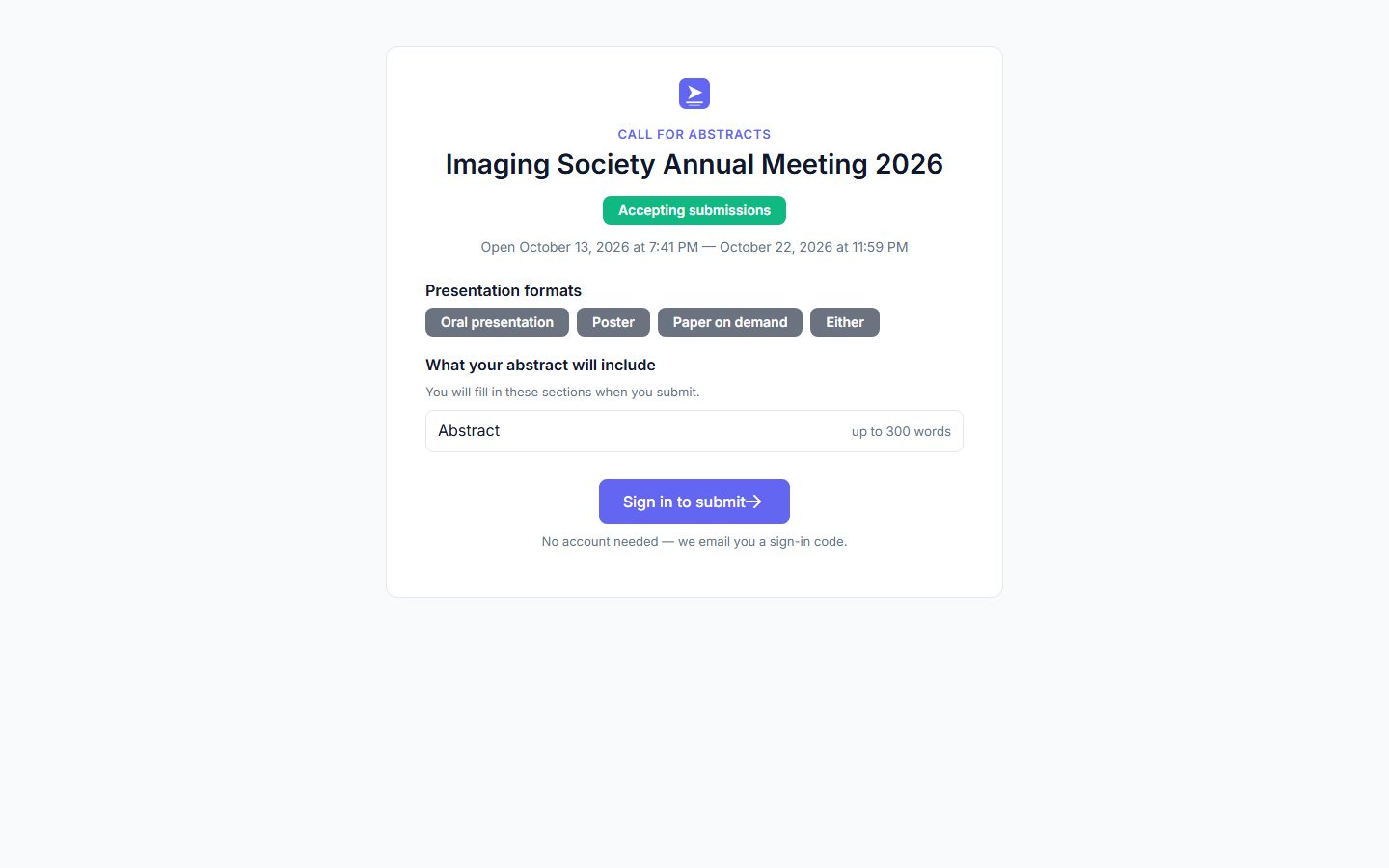
1. The call for abstracts opens
The call has a public page: the presentation formats, what an abstract includes and when it closes. Authors submit with an emailed sign-in code, no account needed.
Modules
A module for every stage. Switch on the ones this event needs.
Internet Uploads is always on. The rest are switched on per event, so a small workshop and a 2,000-abstract congress run on the same platform without the workshop paying for machinery it never opens. Open any module to see what it does.
Collect and review
Before the meeting
Internet Uploads
Switch it on Every event: getting the files out of the speakers is the one job every conference has.
- An upload window plus a per-talk cut-off (24 hours before by default), in venue time
- Every replaced file kept, with history and rollback
- Reminders at 7, 3 and 1 days out that stop when the file arrives
- Personal links let speakers upload without signing in
- Office decks previewed as PDF in the browser
- Reuse a speaker's files from past events
Needs Nothing. It is on for every event, with its defaults already set.
Every setting and its default, in the product catalog →Call for Abstracts
Switch it on When you run the call yourself, from asking for submissions to putting the accepted ones in the program.
- An open call with a public link, or invite-only from your contact book
- Blind review with conflict-of-interest exclusion
- Auto-assignment to the least-loaded qualified reviewer, with normalized scores
- A selection board by track, with capacity targets and split-vote flags
- Decision letters in batches, one revision round, and whole session proposals
- A typeset PDF abstract book, and conversion into presentations, posters and sessions
Needs No other module. Tracks before the call opens; a questionnaire for numeric scores.
Every setting and its default, in the product catalog →Review & Approval
Switch it on When decks must be checked before they are shown: compliance, accredited education, sponsored sessions.
- Reviewers or teams for the whole show, a track, a session or one talk
- One reviewer, or several with a majority or unanimous rule and a manager override
- Up to three revise-and-resubmit rounds; approved files locked against replacement
- Questionnaire scoring and written feedback for the speaker
- Exempt tracks, sessions or talks; automatic reassignment on a missed deadline
- Progress reports by track, session and reviewer
Needs Nothing else.
Every setting and its default, in the product catalog →Posters
Switch it on When the event runs a second content line beside the spoken program.
- Create by hand, import from a spreadsheet, or convert from accepted abstracts
- Board numbers in bulk, with a prefix and location
- Author uploads in the formats you allow, with optional extra files
- Single-reviewer review: approve, request a revision or reject
- Delegate questions, answered from the portal or the app
Needs Review & Approval, for poster review only.
Every setting and its default, in the product catalog →Papers on Demand
Switch it on When work deserves a place in the program but not a room slot: overflow, hybrid, archive.
- MP4, MOV or WebM uploads with automatic versioning
- Every author can upload, not only the primary
- Convert from accepted abstracts, with duplicate protection
- Draft, published and withdrawn; only published papers reach viewers
- Streamed in the page with scrubbing; no download
Needs Nothing else.
Every setting and its default, in the product catalog →Publish
For attendees, before and during
Abstract Viewer
Switch it on When the abstract book should be online, searchable and current, not a frozen PDF.
- Only acceptances that have been sent to the author
- Branded templates in your organization library, with per-event overrides
- Show or hide keywords, disclosures and individual sections
- Its own open and close window; attendees-only by default
- Each entry links to the session, poster or paper it became
Needs Call for Abstracts.
Every setting and its default, in the product catalog →Poster Viewer
Switch it on When the posters should outlive the two hours they were up on the boards.
- Gallery templates, branding, featured posters and sponsor banners
- Its own viewing window, separate from uploads
- Posters shown in the page (PDF, image or slides) with their extra files
- View counts by day, track, category and poster
Needs Posters.
Every setting and its default, in the product catalog →Paper Viewer
Switch it on When the on-demand program needs its own front door.
- Gallery templates from your library, with per-event overrides
- Its own window; public by default, attendees-only optional
- Video streamed in the page, with extra files alongside
Needs Papers on Demand.
Every setting and its default, in the product catalog →Attendee App
Switch it on When delegates should have the live program on their phones, so a room change is right in their hands.
- A mobile web app at your event's address; works offline once loaded
- A now-and-next strip and a personal schedule that flags clashes
- Faculty, posters, abstracts and papers, with questions and bookmarks
- Speakers upload files and read reviewer feedback from the phone
- Public or sign-in access, with an optional attendee allowlist
Needs A URL slug for the event.
Every setting and its default, in the product catalog →In the room
On the day
On-site Delivery
Switch it on When presentations should reach the room computers by themselves and the crew should see and steer every room from one place.
- One Windows agent, four roles: room, Speaker Ready, reception and event hub. Use only the ones your event needs
- Files delivered ahead and kept on the machine; a room runs a full day without the network
- Launch a talk, show the holding screen, rehearse or stop, from the portal or a phone
- Speakers check in, review and save changes back at Speaker Ready
- Readiness checks for every computer: green, yellow or red
- Crew coverage by room, zone and Speaker Ready group, and Call tech by text
Needs Windows 10 (21H2) or 11, 64-bit, with PowerPoint 2019 or Microsoft 365; two displays for a room computer.
Beacon
Switch it on When signage should follow the program, so a session that moves on the agenda moves on the wall.
- Seven display types, from room signs to wayfinding and poster sessions
- Templates built from blocks, with version history
- Screens paired with a six-character code; a fleet view and remote reload
- An email when a screen goes dark (optional)
- Announcements in three severities; Emergency takes over the screen
- Schedules let one screen change role through the day
Needs Sessions assigned to rooms (not needed for Welcome and Wayfinding screens).
Every setting and its default, in the product catalog →Open Mic
Switch it on When questions should come from phones and be moderated by the chair, not a roving microphone.
- One question channel per room, all day, with a printable QR code
- A moderator link per room, no account needed
- Star, answer, edit or hide questions
- Each question tagged with the session that was running
- Export the queue to Excel
Needs Rooms defined on the venue.
Every setting and its default, in the product catalog →Session Feedback
Switch it on When you need evaluations for accreditation, speaker development or knowing which sessions landed.
- Questionnaires with four question types, or from a template
- Assign to a session type, track or single session
- QR codes generated for each session, ready to print
- Opens when the session ends; optional anonymous responses
- A dashboard of averages and distributions, with export
Needs At least one questionnaire, assigned to something.
Every setting and its default, in the product catalog →Building and scheduling the program itself is not a module: the platform, the agenda grid, spreadsheet import, communications, speakers, tracks and venues are always there. The full catalog lists every setting each module carries and the value it defaults to.
On show day
The crew runs the rooms from the same record.
A small Windows agent runs each station your event needs: the room computers, Speaker Ready, the reception desk and an event hub. The crew sees and steers all of them from one place.
- Speakers check in, review and fix their slides at Speaker Ready; the room gets the version they approved.
- The crew launches talks, shows the holding screen and runs rehearsals from the portal or a phone.
- Each room keeps its files on the machine and runs a full day without the network; an optional event hub serves them over the venue's own network.
Mix and match for each event. Run the room computers on their own, add Speaker Ready, add the reception desk, or use all four. The event hub is an extra layer of protection, there if you want it.
Runs on Windows 10 (21H2) or 11 with PowerPoint 2019 or Microsoft 365.
Read what the video shows
- On show day, every computer at the meeting reports in live: Speaker Ready, the reception desk and the rooms.
- Every room has a tech, organized by zone, with a lead over all of them.
- In Hall 1, a speaker has no sound. The computer in the room calls a tech with one button.
- The tech covering Hall 1 gets a text within seconds.
- It opens their page, with their rooms live.
- From the hallway, they can see the room’s computer and the controls for it. No laptop needed.
Upload your slides — Tuesday 09:15, Hall 2C
Your link, no password. Versions kept; the room gets the latest.
Your Rostrum sign-in code: 482 913
Valid for ten minutes. Your queue is waiting.
Two reviews by Friday · slides by 12 Nov
One list per person, nothing else to learn.
Nobody has to make an account
Speakers, reviewers, authors and attendees participate without a password.
Late speaker content has one cause above all others: a login nobody remembers. So Rostrum does not ask for one. Speakers upload through a personal link. Reviewers and attendees sign in with a code sent to their email. Poster authors and moderators use tokenized links. Each person sees a short list of what they owe and by when — and nothing else.
The result is that most of the people who touch a conference never see a sign-in screen, and the program committee stops chasing passwords.
Illustration: the three ways people get in.
Read what the video shows
- Speakers don’t need an account. They get a personal link by email, and one click opens their page for the meeting.
- It shows what’s needed from them and by when. Here, it’s the slides for one talk.
- Everything about the talk is in one place: the session, the room and the time.
- They choose their slides and upload them. Every version they send is kept.
- Before they finish, they can check exactly what will be shown in the room.
- And that’s it. Their list is clear, with nothing left to do.
AI, where it helps
Assistance that proposes — never acts alone
AI in Rostrum is a platform capability, not a bolt-on chatbot. It shows up where organizer work is genuinely tedious, drafts something concrete, and shows you the whole proposal before anything is created.
Point it at your website
Give guided setup your event's site and it pre-fills the name, dates, venue and topics it finds — every field confirmed by you, never silently applied.
Describe your program, review a draft
Tell the Program builder what you want — five rooms, an opening keynote, lunch at noon, done by 11 on the last day. It asks what it needs to know, then proposes a complete schedule you can revise in plain language before creating it. It can even start from last year's program.
Sessions from a pile of talks
Hand it your unplaced presentations and it groups them by topic into named session proposals — reading titles and abstracts only, never author identities — for you to apply, adjust or ignore.
Enabled per organization, with a monthly usage budget. Nothing is delegate-facing, and nothing is written without your review — and when AI is off, the platform simply works as it always did.
Read what the video shows
- A new meeting: the dates and the venue are set, and nothing is scheduled yet.
- The organizer opens Athena, Rostrum’s assistant, and describes the program the way they’d describe it to a colleague: the days, the rooms, the sessions and the breaks.
- Athena drafts every session with its room and its time. Nothing is created until the organizer says so.
- One click creates the rooms and the sessions.
- Here’s the whole first day on the agenda grid.
- And day two, closing plenary included. Any session can be dragged to a new room or time, and Rostrum flags a clash.
The unglamorous part
Somebody has to chase the eleven people who haven't uploaded.
It is the most reliably painful job in conference operations, and across the vendors we researched it is largely still done by a person with a spreadsheet at eleven at night. Every platform sends email. Very few chase the people who have done nothing at all.
You set the schedule, not the vendor
Reminders go out on the intervals you choose before each deadline — not on a cadence hard-coded by someone who has never run your meeting.
Deadlines are judged in the venue's timezone
A midnight deadline in Vienna is midnight in Vienna, wherever the speaker or the server happens to be.
One reminder per person per day
Someone presenting in three sessions gets one email, not three. Nagging that feels like spam gets filtered, and then it chases nobody.
It runs whether or not anyone opens the portal
The sweep is automatic and hourly. Your staff find out who is outstanding by looking, not by remembering to check.
of the twenty-three vendors we researched document no way to chase people who have submitted nothing. Where reminders are documented, they are usually a manual send.
other vendors document all three of a customer-set reminder schedule, evaluation in the event venue’s timezone, and deduplication to one message per person per day.
Competitive research, August 2026 — twenty-four vendors assessed against their own published documentation. Not documented is not the same as not offered. The method is in our buyer’s guides.
Read what the video shows
- Chasing slides starts with one deadline for the whole meeting.
- The organizer sets when uploads open and close, and how long before each talk the files are due.
- Reminders go out on their own: 7, 3 and 1 day before the deadline, at 8 AM, venue time.
- To chase today, they send the same reminder by hand.
- The Missing Files filter picks out exactly the speakers who haven’t sent anything. Here, 9 of 24.
- Each of them gets one email listing every talk they still owe.
- Every reminder is on record, and the automatic ones never send anyone more than one a day.
Pricing
Nine numbers. Published, because you should be able to plan a budget without booking a demo.
Of the twenty-four vendors we looked at, nine publish a price. We think that is the wrong way round, so here is ours. Annual, per organization, in US dollars.
| Bundle | Small up to 200 | Mid 201–750 | Large 751–2,000 | Over 2,000 |
|---|---|---|---|---|
| Program The platform, agenda and schedule building, spreadsheet import, speaker file collection with deadlines, content review, communications. | $3,600 | $8,400 | $15,000 | Let's talk |
| Congress Program, plus Call for Abstracts in full, Posters, and Papers on Demand. | $6,000 | $13,200 | $24,000 | Let's talk |
| Congress + Onsite Everything, plus the Attendee App, Beacon signage, Session Feedback, Open Mic, and the public abstract, poster, and paper galleries. | $8,400 | $18,000 | $32,000 | Let's talk |
What the band counts
Everything your program committee handles in a year: every abstract that arrives — including the ones you reject — every session proposal, counted once however many talks it holds, and anything you add or import directly.
It does not count delegates, reviewers, committee members or staff seats, emails sent, files stored, screens deployed, or rooms used. And converting an accepted abstract into a presentation is never a second charge — it was already counted when it arrived.
No implementation fee, on any tier. Crossing a band during your year is flagged, never blocked, and settled at renewal — nobody gets cut off in the middle of their meeting.
Running events for clients? Partner terms are an annual fee plus a per-event price, sized by the same bands. Talk to us about partner terms.
Questions about the bands, abstracts or on-site? Read the short answers.
Independence
We don't sell A/V, staffing or registration, so we never compete with the company running your room.
For organizers
Your A/V partner, your registration system and Rostrum each do one job. Nothing here is quoted alongside a service you didn't ask for, so the software price is a software price. Change either supplier next year and the program, and its price, don't move.
See pricingFor A/V and production companies
Offer Rostrum to your clients, with your crew on show day: speaker content, the program, Speaker Ready and the rooms. Partner terms are an annual fee plus a per-event price by size. Partners can join our preferred-vendor list, which we share with organizers who ask us for a recommendation.
The page for A/V and production companies →Talk to us about partner termsYour data leaves with you
Rostrum reads and writes standard formats, and your program leaves in a spreadsheet the same way it can arrive in one.
Read the manualWhere things stand
Built, released, and in production since August 2026.
Rostrum went to production in August 2026 after twelve months of building. It is a complete platform, not a prototype: more than one hundred data models, more than six hundred API endpoints, five interface languages, permissions enforced at six levels of scope, and more than 12,000 automated tests that gate every release.
What it does not have yet is customers. We would rather say so than imply otherwise with a wall of logos. If you are weighing us against an incumbent, that is a real risk and it should be priced into your decision. We take it seriously enough that there's a program built around it — ask, and we'll send you the terms.
Built by someone who has run the room.
Jason Brenna spent eighteen years behind the scenes of scientific meetings — in the speaker ready room and on the program committee’s timeline — sixteen of them building the software that collected the files and ran the room. Every year the same societies stitched that one piece together with an abstract system, a scheduling spreadsheet, a signage vendor and an event app, and every year the failures happened in the seams. Rostrum is the thing the seams were asking for.
Documentation
Read the manual before you talk to us.
Both documents are public and complete. If you are shortlisting vendors, the second one is the useful one: every setting in the platform with the value it defaults to, including the handful whose labels are misleading and the places where one module quietly depends on another.
Questions
What organizers ask before they talk to us
Short answers, drawn from the rest of this page and the manual.
Do speakers, reviewers and authors need an account?
No. Speakers upload through a personal link, and reviewers, authors and attendees sign in with a one-time code sent to their email. Nobody has to create or remember a password.
What does Rostrum cost?
The price is published on this page: three bundles, each priced by the size of your program, from $3,600 a year (Program, up to 200) to $32,000 a year (Congress + Onsite, 751 to 2,000). Prices are annual, per organization, in US dollars, with no implementation fee. Above 2,000, we quote.
What does the size band count?
Everything your program handles in a year: every abstract that arrives, including the ones you reject, every session proposal (counted once), and anything you add or import directly, such as presentations, posters and papers. It never counts delegates, reviewers, staff seats, emails, files, screens or rooms, and converting an accepted abstract is never a second charge.
What happens if we outgrow our band during the year?
Crossing a band is flagged, never blocked, and settled at renewal. Nobody is cut off in the middle of their meeting.
Do we have to run a call for abstracts?
No. You can build the program by hand or import it from a spreadsheet, and switch on only the modules your event needs. Without abstracts, the size band counts your presentations, posters and papers.
Do you sell A/V, staffing or registration?
No. Rostrum is software only, so we never compete with the company running your room. If you need one, we keep a list of preferred A/V and production companies and can recommend one for your event. Those companies can also offer Rostrum to their own clients on partner terms: an annual fee plus a per-event price by size.
What does on-site delivery need?
A Windows 10 (21H2) or 11 computer, 64-bit, for each station you use, with PowerPoint 2019 or Microsoft 365, and two displays for a room computer. Mix and match the stations for each event: the room computers on their own, or with Speaker Ready and reception. Each room runs a full day without the network, and the event hub adds an extra layer of protection if you want it.
Can our data leave with us?
Yes. Rostrum reads and writes standard formats, and your program leaves in a spreadsheet the same way it can arrive in one.
Does Rostrum use AI?
Only where it saves organizers work, and it never acts alone: it drafts a proposal, such as a schedule or a set of sessions, and nothing is created until you have reviewed it. It is switched on per organization, and nothing is delegate-facing.
How do we get started?
Tell us about your meeting: the date, the size and what you use today. We reply within one business day with how it would run on Rostrum and the price that applies.
Your next meeting
Tell us about your meeting. We'll tell you how it would run on Rostrum.
Share the date, the size and what you use today. We reply within one business day, and early customers receive founding partner terms.